
This morning, I needed to update some articles on my site. This site uses Hugo and is hosted on Netlify.
After I finished my edits, committed them to my Git repository, and pushed the changes, the website should have been updated within a few seconds.
But when I checked the blog post, nothing had changed. I started wondering what I had done wrong. I hadn’t changed the build script at all.
So I opened the Netlify dashboard and checked the build log. Here’s the interesting part:
11:04:24 AM: mise hugo-extended@0.163.1 [1/3] install
11:04:24 AM: mise WARN  GitHub rate limit exceeded. Resets at 2026-06-15 04:19:10 +00:00
11:04:24 AM: mise WARN  [gohugoio/hugo/hugo-extended] failed to fetch version tags, URL may be incorrect: HTTP status client error (403 rate limit exceeded) for url (https://api.github.com/repos/gohugoio/hugo/releases)
11:04:24 AM: mise WARN  GitHub rate limit exceeded. Resets at 2026-06-15 04:19:10 +00:00
11:04:24 AM: mise WARN  GitHub rate limit exceeded. Resets at 2026-06-15 04:19:10 +00:00
11:04:24 AM: mise ERROR Failed to install aqua:gohugoio/hugo/hugo-extended@0.163.1: HTTP status client error (403 rate limit exceeded) for url (https://api.github.com/repos/gohugoio/hugo/releases/tags/0.163.1): HTTP status client error (403 rate limit exceeded) for url (https://api.github.com/repos/gohugoio/hugo/releases/tags/v0.163.1)
11:04:24 AM: mise ERROR Run with --verbose or MISE_VERBOSE=1 for more information
11:04:24 AM: Error during Hugo 0.163.1 install
11:04:24 AM: Failing build: Failed to install dependencies
For some reason, I got the “GitHub rate limit exceeded” error message for the first time after years of using Netlify.
At that point, I realized it wasn’t really Netlify’s fault, and I couldn’t blame GitHub for changing its rate limits either.
But I couldn’t wait until the GitHub API limit reset.
So I needed to find a way to download the Hugo binary from GitHub without relying on Netlify’s built-in solution, which currently uses the GitHub API.
My first thought was to ask AI to generate a shell script for that. But then I realized: what about using Node Package Manager (NPM) instead?
I already use Node.js for some post-build actions, so adding one extra dependency wouldn’t hurt the project.
I was pretty sure someone had already created an NPM package for Hugo builds, and it turns out they had.
Using Hugo via NPM
Special thanks to @jakejarvis for publishing and maintaining the hugo-extended package on the NPM registry!
I did a quick code review of the package.
It downloads and installs the Hugo binary automatically without going through the GitHub API, unlike Netlify’s default approach.
The binary is still downloaded from Hugo’s official GitHub repository, so you don’t need to worry about its legitimacy.
Anyway, if you’re using Hugo too and haven’t set it up through NPM yet, here’s how to do it.
First, make sure you already have both Hugo and Node.js installed.
Then go to your Hugo project directory, for example ~/example/.
cd ~/example/Initialize the directory as a Node.js project:
npm init -yInstall hugo-extended as a development dependency:
npm install hugo-extended --save-devThis will create a new package.json file.
You need to edit the scripts section.
The two basic scripts we need are:
npm run dev, which is equivalent tohugo server -D -F. This starts the development server and previews both draft and future posts.npm run build, which is equivalent tohugo build. This generates production-ready static files that can be deployed to hosting providers such as Netlify or Cloudflare Pages.
 1{
 2  "name": "example",
 3  "version": "1.0.0",
 4  "description": "",
 5  "main": "index.js",
 6  "scripts": {
 7    "dev": "hugo server -D -F",
 8    "build": "hugo build"
 9  },
10  "keywords": [],
11  "author": "",
12  "license": "ISC",
13  "type": "commonjs",
14  "devDependencies": {
15    "hugo-extended": "^0.163.1"
16  }
17}Now that we’ve set up the Node.js package, we can change Netlify’s build command from hugo build to npm install && npm run build.
You can also configure it through netlify.toml like this:
[build]
  command = "npm install && npm run build"
  publish = "public"
How About the Build Speed?
Surprisingly, there’s no performance degradation at all.
Since the Node module’s role is only to install the correct Hugo binary, while the actual site generation is still handled by Hugo itself, the build remains just as fast.
Here’s the build and deployment time comparison before and after switching to Hugo via NPM, taken from my Netlify dashboard.
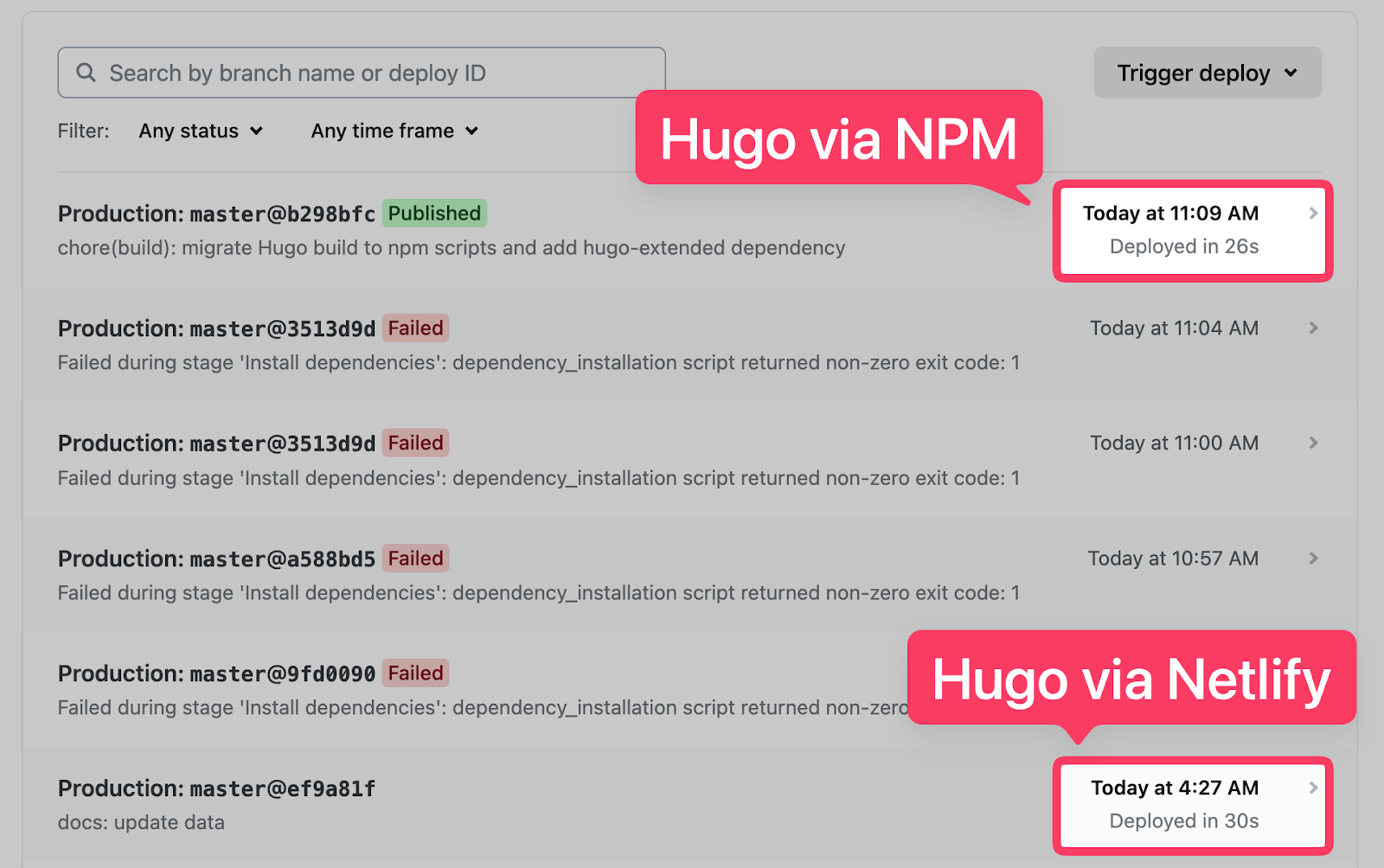
They’re pretty much the same, right? Hey, as long as I can build the Hugo site without hitting rate limits, I’ll take that as a win!
Final Thoughts
That’s the story of how I managed to “bypass” the GitHub API rate limit issue inside Netlify.
I think from now on, I’ll just use Hugo via NPM instead of relying on Netlify.
It integrates better with a Node.js-based workflow, and the only commands I need to remember are npm install, npm run dev, and npm run build.
Hopefully, I won’t have to worry about failed builds caused by GitHub API rate limits anymore.
As usual, if you have any questions or know a better approach, feel free to leave a comment below.
Thanks for reading, and see you next time!