
So I want to use VLC on Android to play some video from SMB Share.
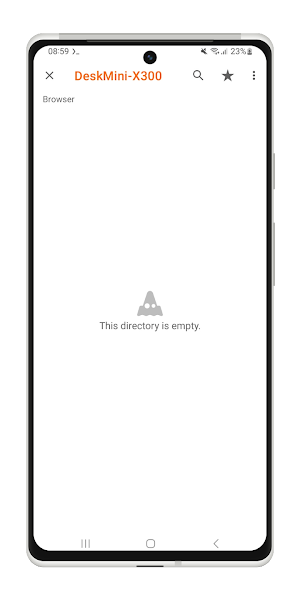
But somehow it doesn’t work at all. The folder appears empty, and it doesn’t prompt me for a username and password.
I didn’t know the source of this issue. Is it the Windows problem or VLC problem?
Spoiler alert: It’s not Windows fault.
So here’s how I figure out the source of the problem and fix it.
Video
Not in the mood for reading? Watch the video instead.

Testing The SMB Share from Android
The first suspect most of the time was the SMB Share on Windows itself. It could be misconfigured to prevent access from another device. Naturally, I checked it first using another app.
Since I was using a Samsung Galaxy S10 Lite, I tested using the built-in Samsung My Files.
The built-in Samsung My Files file manager app can access the SMB Share normally. That means something is wrong with the VLC Android app, not the Windows SMB share.
If you take a look at the picture below, that’s how it looks when I tried to access SMB Share from VLC for Android app.
Now we know that it’s not the SMB fault, what’s the solution?
Correctly Access Password-Protected SMB Share from VLC for Android
The solution is quite simple, but really not obvious for most users.
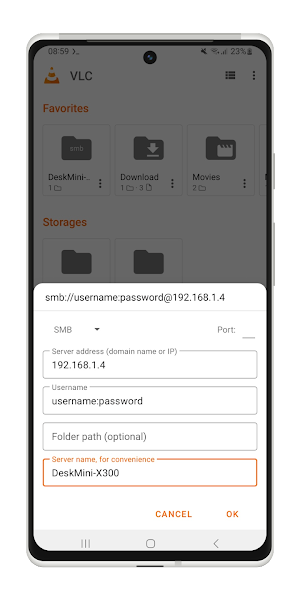
I searched online and found out that you need to enter username:password format in the Username field.
Replace the username and password with their correct credentials.
For example, if your username is admin and the password is my-secret-password then you should write admin:my-secret-password in the Username field.
It’s not really user friendly, isn’t it?
In my opinion, they should make it clear or make a separate Password field like most apps out there.
Anyway, once it’s done, I can finally browse and play my media collection on my SMB server!
The credentials will be stored securely by VLC. So next time you open the SMB Share, it’ll not ask you the username and password again.
Final Thoughts
That’s it for today. Thanks for reading and hope this tutorial helps you!
References
- can’t connect to smb share (#2884) · Issues · VideoLAN / VLC-Android · GitLab