Did you know that Microsoft 365 for Mac, Office 2024 for Mac, and Office 2021 for Mac support only the three most recent major versions of Apple’s macOS? As of September 2025, these are macOS Tahoe, macOS Sequoia, and macOS Sonoma.
What if you’re using a macOS version older than Sonoma? What if you try to install the latest Microsoft Office for Mac installer, and you get a warning message like this:
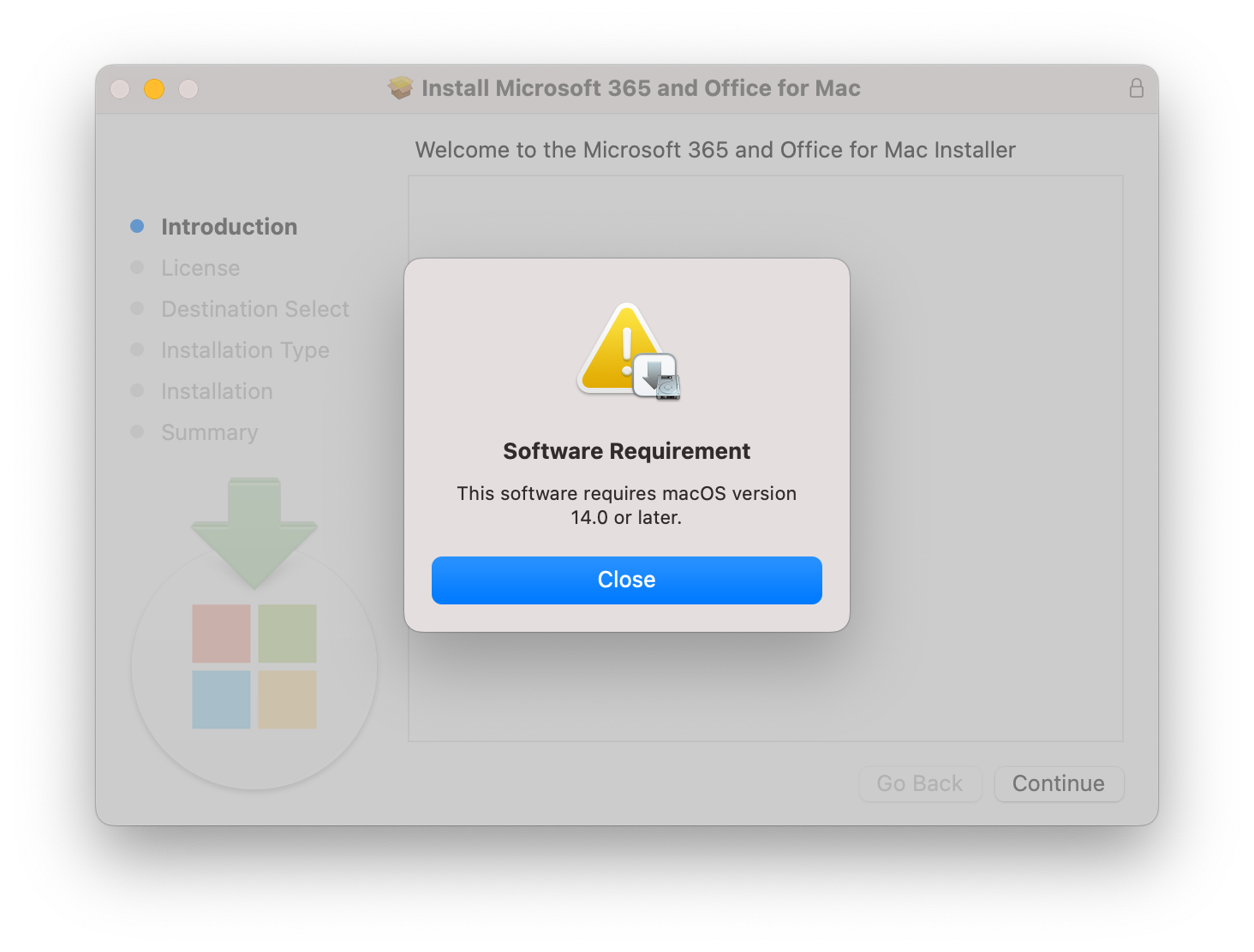
Can you still use Microsoft Office on macOS?
Yes. You can download and install the latest version compatible with your macOS release using the links below.
Get Microsoft Office 365 for Mac License
You can download Microsoft Office for Mac (or Microsoft 365 for Mac) installers for free. But to use the full features of the Microsoft Office for Mac apps, you need an active license.
If you already have the license, you can try to activate the key or sign in using the license account. If you don’t have the Microsoft Office for Mac license, you can buy one of the currently available licenses from Microsoft Store on Amazon:
- Buy Microsoft Office Home 2024 (Word, Excel, PowerPoint) One-Time Purchase for a single Mac
- Buy Microsoft 365 Personal (Word, Excel, PowerPoint and more), 12-Month Subscription, 1 Person, 1TB Cloud Storage
- Buy Microsoft 365 Family (Word, Excel, PowerPoint and more), 12-Month Subscription, Up to 6 People, 1TB Cloud Storage
If those license types are not enough, you can find more Microsoft Office 365 licenses from Microsoft Store.
Microsoft Office for Mac Download Links grouped by macOS Version
Below is a list of available Microsoft Office for Mac installers. Download and install the one that matches your current macOS version. The Office apps will continue to work, but they will no longer receive updates on older macOS versions.
There are three types of downloads you can get:
- Microsoft Office Suite: Includes standard apps like Word, Excel, PowerPoint, Outlook, etc, without Microsoft Teams.
- Microsoft Office Suite Business Pro: Same as standard Microsoft Office, but with Microsoft Teams.
- Individual downloads for Word, Excel, PowerPoint, Outlook, and OneNote.
These files are hosted directly by Microsoft under the domain officecdn.microsoft.com, which is a CDN owned by Microsoft. I don’t host these files myself, nor are they from random third-party sources, so they should be safe to use.
Table of Contents
- Get Microsoft Office 365 for Mac License
- Microsoft Office for Mac Download Links grouped by macOS Version
- Download Microsoft Office for Mac (Latest)
- Download Microsoft Office for macOS 27 Golden Gate
- Download Microsoft Office for macOS 26 Tahoe
- Download Microsoft Office for macOS 15 Sequoia
- Download Microsoft Office for macOS 14 Sonoma
- Download Microsoft Office for macOS 13 Ventura
- Download Microsoft Office for macOS 12 Monterey
- Download Microsoft Office for macOS 11 (Big Sur)
- Download Microsoft Office for macOS 10.15 (Catalina)
- Download Microsoft Office for macOS 10.14 (Mojave)
- Download Microsoft Office for macOS 10.13 (High Sierra)
- Download Microsoft Office for macOS 10.12 (Sierra)
- Download Microsoft Office for Mac OS X 10.11 (El Capitan)
- Download Microsoft Office for Mac OS X 10.10 (Yosemite)
- Download Microsoft Office for Mac OS X 10.9 (Mavericks)
- Download Microsoft Office for Mac OS X 10.8 (Mountain Lion)
- Download Microsoft Office for Mac OS X 10.7 (Lion)
- Download Microsoft Office for Mac OS X 10.6 (Snow Leopard)
- Download Microsoft Office for Mac OS X 10.5 (Leopard)
- Download Microsoft Office for Mac (Standalone / Perpetually-Licensed)
- Microsoft Office Homebrew Installation
Download Microsoft Office for Mac (Latest)
- Version: Latest
- Supported macOS Versions: macOS 14 (Sonoma) or later
| Product | Link |
|---|---|
| Microsoft Office | Microsoft_365_and_Office_Installer.pkg |
| Microsoft Office Business Pro | Microsoft_365_and_Office_BusinessPro_Installer.pkg |
| Microsoft Word | Microsoft_Word_Installer.pkg |
| Microsoft Excel | Microsoft_Excel_Installer.pkg |
| Microsoft PowerPoint | Microsoft_PowerPoint_Installer.pkg |
| Microsoft Outlook | Microsoft_Outlook_Installer.pkg |
| Microsoft OneNote | Microsoft_OneNote_Updater.pkg |
Download Microsoft Office for macOS 27 Golden Gate
- Get the latest Microsoft Office for Mac.
Download Microsoft Office for macOS 26 Tahoe
- Get the latest Microsoft Office for Mac.
Download Microsoft Office for macOS 15 Sequoia
- Get the latest Microsoft Office for Mac.
Download Microsoft Office for macOS 14 Sonoma
- Get the latest Microsoft Office for Mac.
Download Microsoft Office for macOS 13 Ventura
- Final Version: 16.101 (25091314)
- Release Date: September 16, 2025
- Supported macOS Versions: macOS 13 (Ventura) or later
| Product | Link |
|---|---|
| Microsoft Office | Microsoft_365_and_Office_Installer.pkg |
| Microsoft Office Business Pro | Microsoft_365_and_Office_BusinessPro_Installer.pkg |
| Microsoft Word | Microsoft_Word_Installer.pkg |
| Microsoft Excel | Microsoft_Excel_Installer.pkg |
| Microsoft PowerPoint | Microsoft_PowerPoint_Installer.pkg |
| Microsoft Outlook | Microsoft_Outlook_Installer.pkg |
| Microsoft OneNote | Microsoft_OneNote_Updater.pkg |
Download Microsoft Office for macOS 12 Monterey
- Final Version: 16.88 (24081116)
- Release Date: August 13, 2024
- Supported macOS Versions: macOS 12 (Monterey) or later
| Product | Link |
|---|---|
| Microsoft Office | Microsoft_365_and_Office_Installer.pkg |
| Microsoft Office Business Pro | Microsoft_365_and_Office_BusinessPro_Installer.pkg |
| Microsoft Word | Microsoft_Word_Installer.pkg |
| Microsoft Excel | Microsoft_Excel_Installer.pkg |
| Microsoft PowerPoint | Microsoft_PowerPoint_Installer.pkg |
| Microsoft Outlook | Microsoft_Outlook_Installer.pkg |
| Microsoft OneNote | Microsoft_OneNote_Updater.pkg |
Download Microsoft Office for macOS 11 (Big Sur)
- Final Version: 16.77 (23091003)
- Release Date: September 12, 2023
- Supported macOS Versions: macOS 11 (Big Sur) or later
| Product | Link |
|---|---|
| Microsoft Office | Microsoft_365_and_Office_Installer.pkg |
| Microsoft Office Business Pro | Microsoft_365_and_Office_BusinessPro_Installer.pkg |
| Microsoft Word | Microsoft_Word_Installer.pkg |
| Microsoft Excel | Microsoft_Excel_Installer.pkg |
| Microsoft PowerPoint | Microsoft_PowerPoint_Installer.pkg |
| Microsoft Outlook | Microsoft_Outlook_Installer.pkg |
| Microsoft OneNote | Microsoft_OneNote_Updater.pkg |
Download Microsoft Office for macOS 10.15 (Catalina)
- Version: October 2022 update (16.66)
- Supported macOS Versions: macOS 10.15 (Catalina) or later
| Product | Link |
|---|---|
| Microsoft Office | Microsoft_365_and_Office_Installer.pkg |
| Microsoft Office Business Pro | Microsoft_365_and_Office_BusinessPro_Installer.pkg |
| Microsoft Word | Microsoft_Word_Installer.pkg |
| Microsoft Excel | Microsoft_Excel_Installer.pkg |
| Microsoft PowerPoint | Microsoft_PowerPoint_Installer.pkg |
| Microsoft Outlook | Microsoft_Outlook_Installer.pkg |
Download Microsoft Office for macOS 10.14 (Mojave)
- Version: October 2021 update (16.54)
- Supported macOS Versions: macOS 10.14 (Mojave) or later
| Product | Link |
|---|---|
| Microsoft Office | Microsoft_365_and_Office_Installer.pkg |
| Microsoft Office Business Pro | Microsoft_365_and_Office_BusinessPro_Installer.pkg |
| Microsoft Word | Microsoft_Word_Installer.pkg |
| Microsoft Excel | Microsoft_Excel_Installer.pkg |
| Microsoft PowerPoint | Microsoft_PowerPoint_Installer.pkg |
| Microsoft Outlook | Microsoft_Outlook_Installer.pkg |
| Microsoft OneNote | Microsoft_OneNote_Updater.pkg |
Download Microsoft Office for macOS 10.13 (High Sierra)
- Version: November 2020 update (16.43)
- Supported macOS Versions: macOS 10.13 (High Sierra) or later
| Product | Link |
|---|---|
| Microsoft Office | Microsoft_365_and_Office_Installer.pkg |
| Microsoft Office Business Pro | Microsoft_365_and_Office_BusinessPro_Installer.pkg |
| Microsoft Word | Microsoft_Word_Installer.pkg |
| Microsoft Excel | Microsoft_Excel_Installer.pkg |
| Microsoft PowerPoint | Microsoft_PowerPoint_Installer.pkg |
| Microsoft Outlook | Microsoft_Outlook_Installer.pkg |
| Microsoft OneNote | Microsoft_OneNote_Updater.pkg |
Download Microsoft Office for macOS 10.12 (Sierra)
- Version: October 2019 update (16.30)
- Supported macOS Versions: macOS 10.12 (Sierra) or later
| Product | Link |
|---|---|
| Microsoft Office | Microsoft_365_and_Office_Installer.pkg |
| Microsoft Office Business Pro | Microsoft_365_and_Office_BusinessPro_Installer.pkg |
| Microsoft Word | Microsoft_Word_Installer.pkg |
| Microsoft Excel | Microsoft_Excel_Installer.pkg |
| Microsoft PowerPoint | Microsoft_PowerPoint_Installer.pkg |
| Microsoft Outlook | Microsoft_Outlook_Installer.pkg |
| Microsoft OneNote | Microsoft_OneNote_Updater.pkg |
Download Microsoft Office for Mac OS X 10.11 (El Capitan)
- Get the latest Microsoft Office 2016 for Mac.
Download Microsoft Office for Mac OS X 10.10 (Yosemite)
- Get the latest Microsoft Office 2016 for Mac.
Download Microsoft Office for Mac OS X 10.9 (Mavericks)
- Get the latest Microsoft Office 2011 for Mac.
Download Microsoft Office for Mac OS X 10.8 (Mountain Lion)
- Get the latest Microsoft Office 2011 for Mac.
Download Microsoft Office for Mac OS X 10.7 (Lion)
- Get the latest Microsoft Office 2011 for Mac.
Download Microsoft Office for Mac OS X 10.6 (Snow Leopard)
- Get the latest Microsoft Office 2011 for Mac.
Download Microsoft Office for Mac OS X 10.5 (Leopard)
- Get the latest Microsoft Office 2011 for Mac.
Download Microsoft Office for Mac (Standalone / Perpetually-Licensed)
Download Microsoft Office 2024 for Mac
- Get the latest Microsoft Office for Mac.
Download Microsoft Office 2021 for Mac
- Get the latest Microsoft Office for Mac.
Download Microsoft Office 2019 for Mac
- Final Version: 16.78 (23100802)
- Release Date: October 10, 2023
- Supported macOS Versions: macOS Sierra (macOS 10.12) or later
| Product | Link |
|---|---|
| Microsoft Office | Microsoft_365_and_Office_Installer.pkg |
| Microsoft Office Business Pro | Microsoft_365_and_Office_BusinessPro_Installer.pkg |
| Microsoft Word | Microsoft_Word_Installer.pkg |
| Microsoft Excel | Microsoft_Excel_Installer.pkg |
| Microsoft PowerPoint | Microsoft_PowerPoint_Installer.pkg |
| Microsoft Outlook | Microsoft_Outlook_Installer.pkg |
| Microsoft OneNote | Microsoft_OneNote_Updater.pkg |
Download Microsoft Office 2016 for Mac
- Final Version: 16.16.27 (20101200)
- Release Date: October 13, 2020
- Supported macOS / Mac OS X Versions:
- macOS 10.12 (Sierra)
- Mac OS X 10.11 (El Capitan)
- Mac OS X 10.10 (Yosemite)
| Product | Link |
|---|---|
| Microsoft Office | Microsoft_365_and_Office_Installer.pkg |
| Microsoft Office Home & Student | Microsoft_365_and_Office_HomeStudent_Installer.pkg |
| Microsoft Word | Microsoft_Word_Installer.pkg |
| Microsoft Excel | Microsoft_Excel_Installer.pkg |
| Microsoft PowerPoint | Microsoft_PowerPoint_Installer.pkg |
| Microsoft Outlook | Microsoft_Outlook_Installer.pkg |
| Microsoft OneNote | Microsoft_OneNote_Updater.pkg |
Download Microsoft Office 2011 for Mac
- Final Version: 14.7.7
- Release Date: September 7, 2017
- Supported Mac OS X Versions:
- Mac OS X 10.9 (Mavericks)
- Mac OS X 10.8 (Mountain Lion)
- Mac OS X 10.7 (Lion)
- Mac OS X 10.6 (Snow Leopard)
- Mac OS X 10.5 (Leopard)
| Product | Link |
|---|---|
| Microsoft Office Suite | MicrosoftOffice2011.dmg |
Microsoft Office Homebrew Installation
If you prefer to install it using a package manager, you can do so with the following Homebrew formulae.
First, trust and tap the Homebrew mirrors repository I maintain:
brew trust junian/homebrew-ms-apps
brew tap junian/homebrew-ms-apps
Then install the formula that matches your macOS version.
Install Microsoft Office for macOS 14 (Sonoma) or later
Use the official homebrew cask formula if you’re using the latest supported macOS version. In this case, if you’re on macOS 14 (Sonoma) or newer, use this homebrew cask.
brew install microsoft-officeInstall Microsoft Office for macOS 13 (Ventura) or older
This Homebrew cask formula will detect your macOS version automatically and find the last compatible version of Microsoft Remote desktop client. It should work from macOS 10.15 (Catalina) to macOS 13 (Ventura).
brew install microsoft-office-for-macConclusion
As usual, if you have any questions, issues, or feedback, feel free to leave a comment below. Thanks for reading.
Cheers!
References
- Upgrade macOS to continue receiving Microsoft 365 and Office for Mac updates — Microsoft Support
- Update history for Office for Mac - Office release notes | Microsoft Learn
- Go back to Office 2016 for Mac after upgrading to Office 2019 for Mac - Microsoft Support
- Upgrade macOS to continue receiving Microsoft 365 and Office for Mac updates
- Update Microsoft 365 or Office on your macOS or iOS device - Microsoft Support
- Microsoft Office 2019 - Wikipedia
- Microsoft Office 2016 - Wikipedia
- Microsoft Office for Mac 2011 - Wikipedia
Disclaimer
This website is a privately owned independent resource blog. This site is not affiliated with, authorized, endorsed, or sponsored by Microsoft Corporation. All product names, logos, and brands are property of their respective owners.
The links provided on this page are direct deep-links to Microsoft's official, public download servers. We do not host, re-upload, or modify any software files on this server. Users are downloading the official, unaltered binaries directly from Microsoft.