
Do you have an Android from Samsung? Any Samsung Galaxy series?
You may have wondered why you keep getting push notifications from Samsung, and most of them are ads or promos.
Those are annoying things, especially after you paid a lot of money to buy the flagship one.
It’s actually pretty straightforward to prevent Samsung from sending you ads.
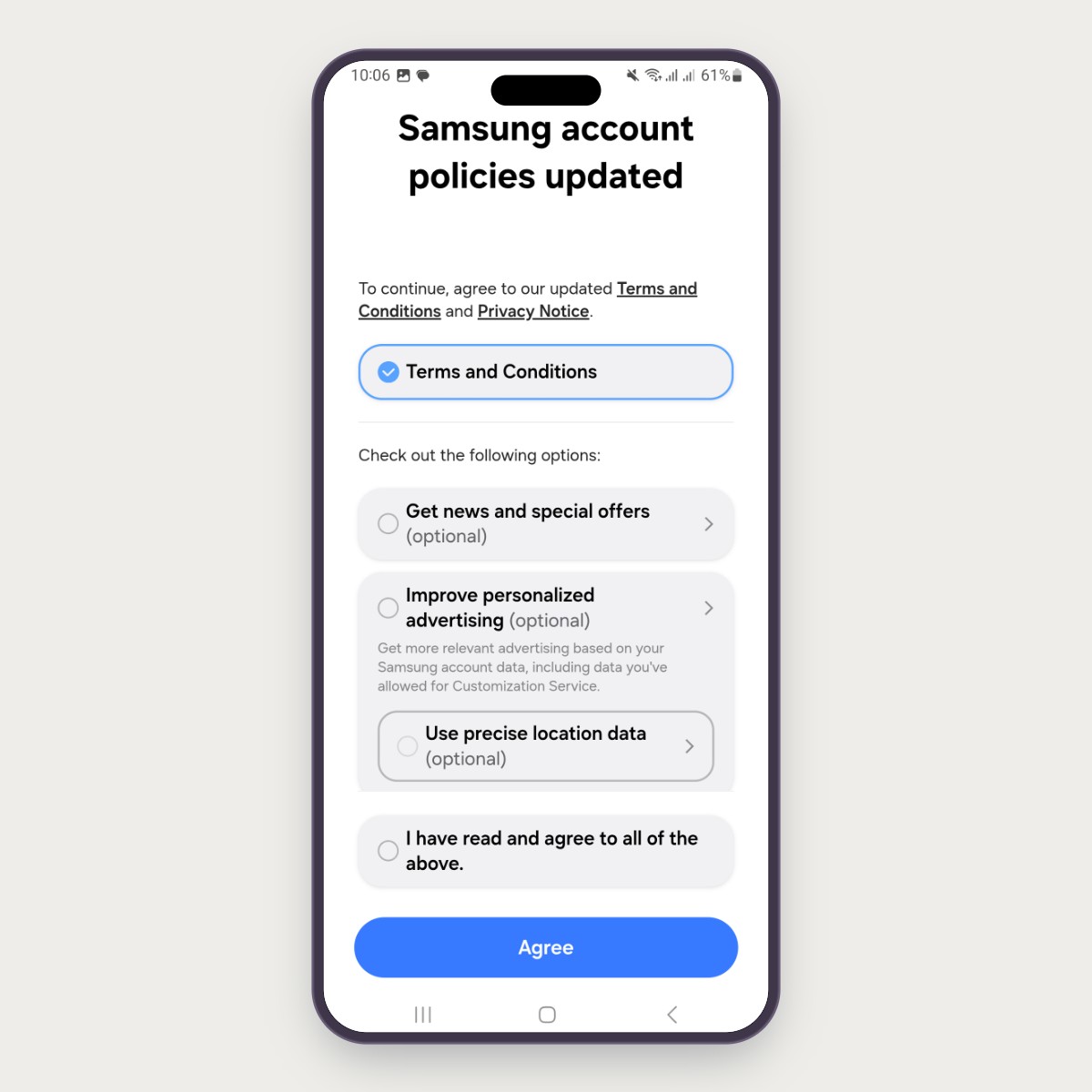
When you see a screen where the phone asks you to accept the Terms and Conditions and Privacy Notice, don’t blindly accept them all. Only accept the necessities, and ignore the optional choices.
- DO NOT tick I have read and agree to all of the above.
- DO NOT tick Improve personalized advertising and its sub-option Use precise location data.
- DO NOT tick Get news and special offers.
- Tick the Terms and Conditions; it’s mandatory and won’t affect the ads or promo.
- Click the Agree button.
That’s it! Now you will never get the notification ads from Samsung.
But keep in mind that Samsung will show this screen occasionally whenever they update their Terms and Conditions. You need to do that again; make it a habit to ignore all the (optional) options.
Final Thoughts
Thanks for reading and see you on my next post!
As usual, if you have any questions or a better method, leave a comment below. Thanks for reading, and see you next time!